

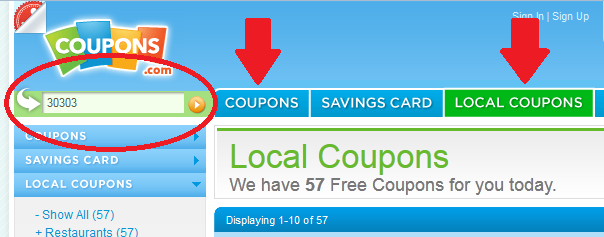
You may have noticed that Coupons.com is making it a little more difficult for us to access zip code specific coupons – so I’ve shown you below what you do in 3 easy steps:
After you’ve clicked the coupon link in my post…
- Click the “local coupons” tab at the top of Coupons.com
- Enter the given zip code in the zip code box and hit enter or click orange arrow
- Click the “coupons” tab at the top of Coupons.com
At this point, you can either scroll through the coupons to find what you’re looking for OR you can go back to my post and re-click my coupon link and it will take you directly to the pre-clipped coupon. If it doesn’t, that will indicate that the coupon has reached its overall print limit and is gone.
I am glad to see they finally fixed this in Internet Explorer too!!