
UPDATE: Coupons.com has removed the change zip code option.
As many of you know, with the new Coupons.com redesign you can no longer change your zip code. Before, you could go to the local coupons tab and change the zip, then go back to coupons and access them. While it appears that you are changing your zip code, it DOES NOT STICK – so you are not looking at anything different. If you want to change your zip code, you must do that in your account settings. That is a big pain in the you know what, so I’ve made it a whole lot easier for you to change your zip by setting up a brand new page here on KrogerKrazy.com where you can change your zip code with just one click!
Here are the zip codes I check every day: 03103, 07738, 12345, 22222, 23240, 30044, 30330, 43420, 51501, 55555, 60611, 62946, 77477, 77079, 80212, 84123, 85021, 90210, 93907, 99218.

The page is located HERE if you’d like to bookmark it. I’ve also set up a button on my sidebar (shown above) where you can easily access it.

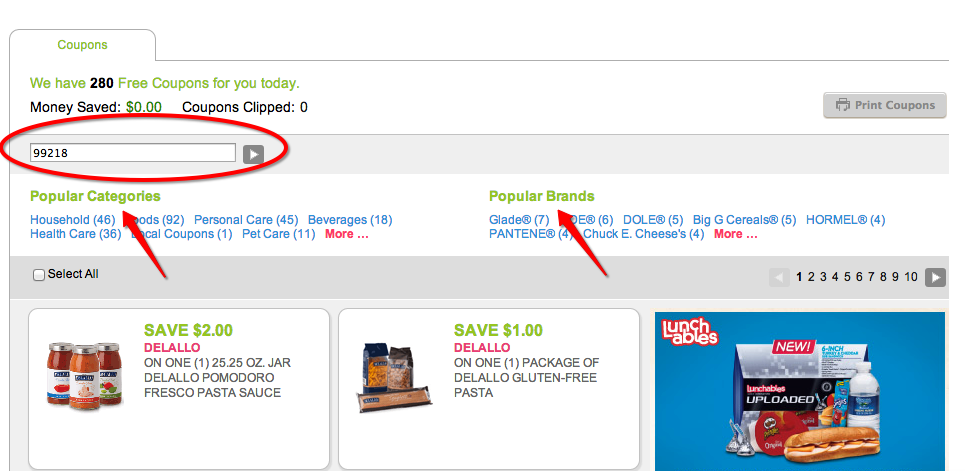
Once you get on the page, you’ll see the zip code box located at the top of the page. Simply change your zip and click the arrow or hit enter. You can also sort by Categories or Brands at the top.
If you have been directed to my page with a direct link to the coupon and it is not showing up, try changing your zip code to the suggested zip and either reclick the link or refresh the coupons page and it should be linked. If it is not, it has likely reached it’s print limit.
I hope this tutorial helps you and thanks for supporting KrogerKrazy.com! 🙂


New code: